
A baby monitor can bring real comfort, but you may not always have one nearby. Maybe you are traveling, waiting for a dedicated monitor to arrive, or trying to reuse an old iPhone already sitting in a drawer. With the right setup, an iPhone can give you a simple video feed, sound alerts, and a quick way to check the nursery from another room.
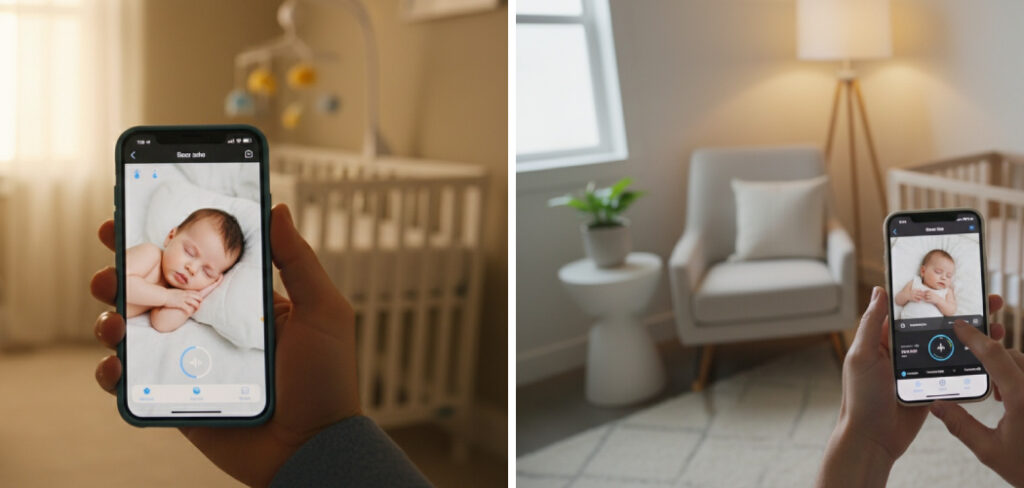
Learning how to use iphone as baby monitor helps you turn familiar technology into a practical backup for naps, bedtime, and travel. You still need safe sleep habits and regular checks, but your phone can add peace of mind. This guide explains what you need, how to set it up, and how to use it safely.
Why Using an iPhone as a Baby Monitor Makes Sense
Using an iPhone as a baby monitor can be a smart choice for first-time parents who want a flexible option. If you already have an old iPhone, you may avoid buying another device right away. That can save money while still giving you access to a camera, microphone, speaker, and live stream.
It also works well for travel. When your baby sleeps in a travel crib at a relative’s house or hotel, your iPhone setup can help you keep an eye on naps without packing extra gear. It can also serve as a backup monitor if your regular device breaks or loses charge.
Most parents want one thing: peace of mind. A careful iPhone setup can support that, especially when you understand its limits.
Tools and Materials You’ll Need
Before you start, gather the basics so setup feels smooth instead of stressful. You do not need a complicated tech kit, but you do need a steady connection, safe placement, and enough power for long naps or overnight checks.
- An old iPhone or spare iPhone for the nursery
- A second device, such as your main iPhone or iPad
- A reliable Wi-Fi connection
- A baby monitor app or secure video calling app
- A charging cable and wall adapter
- A stable phone stand or mount
- A safe surface away from the crib
- Access to privacy settings and notification settings
- A clean camera lens and working microphone
- Optional convenience item: a portable power bank for travel
Check that both devices update properly before you rely on them for monitoring.
8 Step-by-Step Guide on How To Use iPhone As Baby Monitor
Step 1 – Choose the Right iPhone for the Nursery
Start by choosing which iPhone will stay in your baby’s room. Many parents use an old iPhone because it already has a camera, microphone, speaker, and Wi-Fi support. It does not need a cellular plan if it can connect to your home network and run the app you choose.
If you are learning how to use iphone as baby monitor, pick a device that holds charge, runs smoothly, and does not shut down without warning. A cracked screen may not matter, but a weak battery or faulty charging port can cause problems during naps.
Wipe the lens with a soft cloth. A clean lens gives you a sharper video feed, especially in soft nursery lighting where small smudges can blur your baby’s face.
Step 2 – Select a Safe Baby Monitor App
Next, choose a baby monitor app that works across your devices. Look for features like live video, audio monitoring, two-way audio, motion alerts, low-light view, and background noise detection. The app should also have clear privacy settings, since it may stream video from your nursery.
Read the setup notes before downloading. Some apps work only when both devices use the same Wi-Fi connection, while others allow remote viewing when you are away from home. For most parents, same-home monitoring is enough for naps and night checks.
Avoid apps that seem outdated or unclear about security. You want stable notifications, strong connection options, and simple controls that you can use when you are tired at 2 a.m.
Step 3 – Connect Both Devices to Reliable Wi-Fi
A strong Wi-Fi connection makes the whole setup more dependable. Connect the nursery iPhone and your viewing device to the same trusted network. Test the signal in the baby’s room before bedtime, since some corners of the house may have weak coverage.
Stand near the crib area with the iPhone and watch the Wi-Fi bars. If the signal drops, the video feed may freeze, sound may lag, or notifications may arrive late. Thick walls, closed doors, and distance from the router can all affect performance.
If the nursery has poor coverage, move the router, use a Wi-Fi extender, or place the phone where the signal is stronger. Clear audio and steady video matter most when your baby starts stirring.
Step 4 – Position the Camera at a Safe Angle
Place the iPhone on a stable surface where it cannot fall into the crib. Keep it well away from your baby’s reach, including charging cords. A shelf, dresser, or secure wall mount can work if it gives you a clear camera angle.
Aim the camera toward the crib mattress, not directly into your baby’s face from too close. You want to see your baby’s body position, gentle movements, and sleep space without creating glare or shadows. If the room is dim, test the low-light view before your baby falls asleep.
Do not attach the phone to crib rails with loose clips or flexible arms that could slip. The setup should feel steady, quiet, and safely out of the sleep area.
Step 5 – Plug In the Charging Cable Safely
Video streaming drains battery life quickly, even on a newer iPhone. Plug the nursery device into a charging cable before each nap or bedtime. Route the cord behind furniture or along the wall so it stays far from the crib, bassinet, and changing area.
Check that the cable is not frayed, bent sharply, or warm to the touch. A worn cable can stop charging or create a safety concern. Use a reliable wall adapter and avoid overloading an outlet with too many devices.
Once plugged in, confirm that the battery icon shows charging. This small check can prevent the phone from dying halfway through a nap, leaving you with a blank screen and no sound.
Step 6 – Test Audio, Video, and Notifications
Before you rely on the setup, run a full test. Open the baby monitor app, start the live stream, and watch the video from your second device. You should see the crib clearly and hear background noise such as a sound machine, soft breathing, or light movement.
Test the microphone and speaker if your app supports two-way audio. Speak softly from your viewing device and listen in the nursery. The sound should be gentle, not startling. If the volume is too high, lower it before your baby goes down.
Also check notifications. Lock your phone, walk into another room, and make sure sound or motion alerts still come through. This is where how to use iphone as baby monitor becomes practical, not just technical.
Step 7 – Adjust Settings for Night Checks
Your iPhone setup should help you rest, not keep you staring at a screen all night. Adjust brightness, volume, and alert sensitivity so you notice real changes without reacting to every tiny rustle. Babies are noisy sleepers, and normal grunts or wiggles do not always mean they need help.
Turn on Do Not Disturb exceptions if needed, so monitor alerts can still reach you. Keep your viewing device nearby, but avoid placing it under a pillow or blanket where sound may be muffled. If you use a sound machine in the nursery, set alert levels so steady background noise does not trigger constant warnings.
A good setup feels calm. You can glance at the video feed, listen when needed, and still get some rest.
Step 8 – Review Safety and Privacy Before Each Use
Do a quick safety scan before naps and bedtime. Make sure the nursery iPhone is secure, the charging cable stays out of reach, and the camera angle still shows the sleep space. Confirm that the app is connected and the live stream has not paused.
Review privacy settings as well. Use strong passwords, avoid public Wi-Fi for remote viewing, and keep app permissions limited to what the monitor needs. If relatives or babysitters use the setup, explain how it works and when to turn it off.
This final check completes how to use iphone as baby monitor in a safe, repeatable way. The goal is not a perfect tech setup. The goal is a steady, secure tool that supports your regular care.
Common Mistakes When Using an iPhone as a Baby Monitor
One common mistake is placing the iPhone too close to the crib. Even if the view looks better, the device and charging cable should never sit where your baby can reach them. Keep everything outside the sleep space and secure the phone on a stable surface.
Another mistake is relying on battery power alone. A video feed can drain an old iPhone much faster than expected. If the phone dies during a nap, you lose both sound and video. Always plug it in safely and check the charging status before use.
Some parents forget to test notifications while the viewing phone is locked. An app may work perfectly when open but fail to alert you in the background. Check app permissions, volume, focus modes, and notification settings before bedtime.
Privacy is another area people overlook. A baby monitor app should use secure access, strong passwords, and limited sharing. Avoid public networks when streaming from the nursery, especially during travel.
Finally, do not treat the iPhone as a replacement for safe sleep practices or direct supervision. It is a helpful tool, but you still need a firm mattress, clear crib, and regular checks.
Expert Tips
Use a dedicated nursery iPhone if possible. Keeping one device in the room reduces setup mistakes and helps you avoid missed calls, app switching, or accidental disconnection. Rename the device something simple, like “Nursery iPhone,” so it is easy to identify in apps and settings.
Keep the setup simple. One reliable app, one steady camera angle, and one safe charging spot are better than a complicated system you have to fix every night. If you travel, test the setup before your baby’s nap instead of waiting until everyone is tired.
Clean the lens often and restart the iPhone every few days. These small habits can improve video quality, app stability, and connection performance.
Frequently Asked Questions
Can I use FaceTime as a baby monitor?
You can use FaceTime for short checks, but it is not always ideal as a full baby monitor. It may disconnect, ring loudly, or depend on settings that are easy to overlook. A baby monitor app usually gives you better features, such as sound alerts, low-light viewing, and background audio. If you use FaceTime, test it carefully first.
Does an iPhone baby monitor work without Wi-Fi?
Most iPhone monitoring setups need Wi-Fi or mobile data to stream audio and video. If both devices are at home, a reliable Wi-Fi connection is usually best. Without internet, your options become limited and may not work well. For travel, confirm the Wi-Fi quality before you depend on the setup for naps or night checks.
Is it safe to leave an iPhone plugged in all night?
It can be safe when you use a good charging cable, a reliable adapter, and safe cord placement. Keep the phone and cord away from the crib, blankets, and your baby’s reach. Check that the device does not get too warm. If the battery is damaged or swelling, stop using that iPhone immediately.
Can I hear my baby while using other apps?
Some baby monitor apps support background audio, which lets you hear your baby while your screen is locked or while you use another app. This depends on the app and your iPhone settings. Test it before bedtime by locking the phone and walking away. Make sure volume, notifications, and focus settings allow alerts.
What is the best camera angle for the nursery?
The best camera angle shows the crib mattress clearly while keeping the iPhone safely out of reach. Place it high enough to see your baby’s position and movement, but not so far away that the video becomes unclear. Avoid direct glare from lamps or windows. Test the view in daylight and at night.
Conclusion
An iPhone can become a useful baby monitoring tool when you set it up with care. The key steps are simple: choose a reliable device, use a secure baby monitor app, connect to strong Wi-Fi, place the camera safely, plug it in, and test the video feed, audio, and notifications before sleep.
You also need to think about privacy and safe sleep. Keep cords away from the crib, use strong passwords, avoid public networks, and remember that a monitor supports your care but does not replace it.
Once you understand how to use iphone as baby monitor, you can handle naps, travel, and backup monitoring with more confidence. Try the setup during a daytime nap first, then adjust the camera angle, sound, and alerts before using it overnight.

About
Joann Meril didn’t plan on becoming a parenting writer — it found her. After spending several years working as a certified nursing assistant in a pediatric clinic, Joann saw firsthand how anxious and under-informed new parents could feel, even with a hospital full of resources around them. When she had her own two children, that gap became personal. Suddenly she was the one googling things at 2 a.m., comparing baby monitors, and wondering if the swaddle she bought was actually safe.
That experience is what shaped her approach to writing. Joann believes parenting advice should be practical, honest, and free of unnecessary jargon or guilt. She tests products herself whenever possible, reads the actual safety standards instead of just the marketing copy, and isn’t afraid to say when something isn’t worth the money.
Today, Joann writes full-time, covering everything from newborn sleep routines to gear reviews to the small everyday wins that make parenting feel a little less overwhelming. When she’s not researching or writing, she’s usually chasing her own kids around the backyard or drinking coffee that’s gone cold for the third time that morning.
Joann lives in [City/State] with her husband and two children.
Credibility
- Background in pediatric caregiving (CNA)
- Mom of two, hands-on parenting experience
- Hand-tests baby gear before recommending it
- Focus: infant sleep, feeding, gear safety, early development